Alta Call devices selection flow
Alta Call and our webservices are working together to ensure the best audio devices (capture and playback) are used by Alta Call at any time.
This logic is quite complex, in particular for capture devices, because we need to handle the following constraints:
- Users shouldn't have to worry at all about audio devices in order to use Alta Call
- Users should be able to explicitely select audio devices when then need to
Manual device selection can happen in two places:
- Alta Call's UI
- Alta Call's Client Space
Playback device
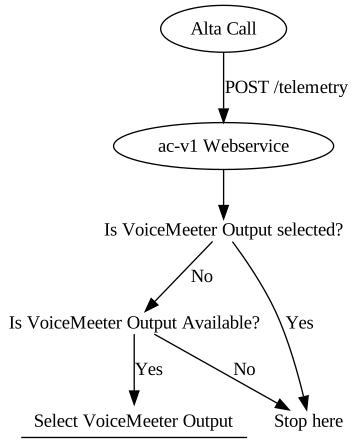
Selecting the playback device is the easiest part because it should always be VoiceMeeter Output. This is how our API ensure the proper playback device is selected:
Capture device
Selecting an adequate capture device is much more difficult because:
- We need to support any audio device
- Audio devices have inconsistent and unstable names:
Microphone sur casque (3- Jabra EVOLVE)could becomeMicrophone sur casque (12- Jabra EVOLVE)when unplugged and plugged again - Physical and virtual devices may be detected and available at different time
- Devices have different priorities: an external headset should take precedence over an internal microphone, as it is expected to provide much better audio quality
- Some devices must be avoided completely, in particular
CableandVoiceMeeter Outputvirtual devices - If a device is selected manually, we don't want to override the user's choice
- If a device disappear or is unplugged, another one should be immediatly selected to replace it
As the logic to handle all these constraints is rather complex, it happens on the server side. At regular intervals, Alta Call sends a list of available devices through a POST /telemetry call. In addition, Alta Call will also send a POST /event call when:
- A device is plugged
- A device in unplugged
The whole flow can be represented as follows:
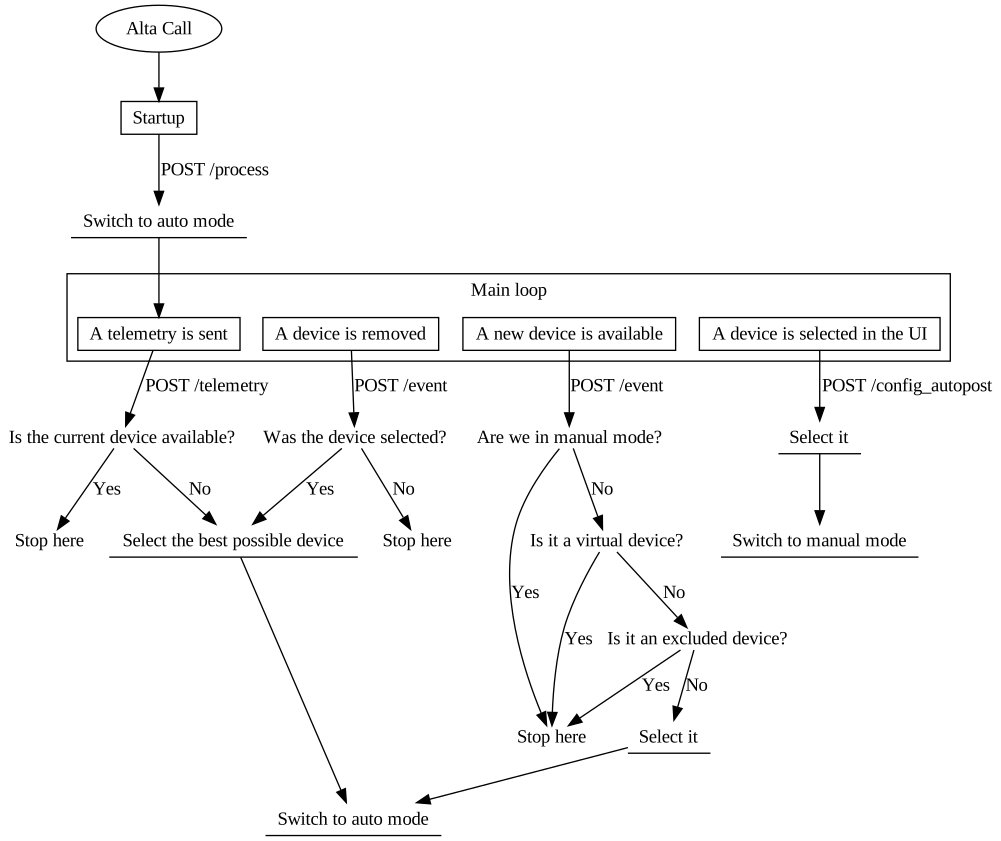
The logic to select the best possible device from a list of candidates is implemented in the Laravel backend within the App\Services\DeviceSelector class (specifically the getProperDevice method). It is then orchestrated by AudioDeviceService during telemetry updates.